

ပုံ
Qwen Image 3 Text to Image မူကွဲများ: 2
ပုံတစ်ပုံလျှင် ၀.၀၄ $ မှ စတင်သည်
ပုံတစ်ပုံလျှင် ၄၀ API ခရက်ဒစ် · ≈ ၄.၃၀ ₽
ကိုက်ညီမှု မတွေ့ပါ။ “video”၊ “FLUX” သို့မဟုတ် “webhooks” ကို စမ်းကြည့်ပါ။
မော်ဒယ်များကို တင်နေသည်…
alibaba/qwen-image-3/edit
# Run the model; wait up to 20 s for the finished result in the same call
curl -X POST "https://api.doitong.ru/v1/run/alibaba/qwen-image-3/edit?wait=20" \
  -H "Authorization: Bearer $DOITONG_API_KEY" \
  -H "Content-Type: application/json" \
  -d '{
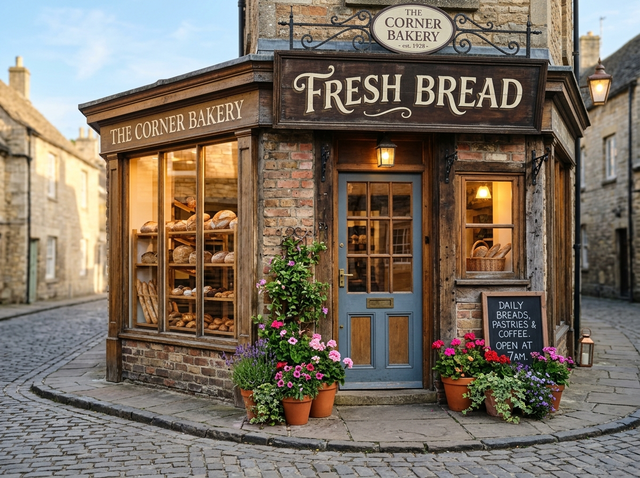
    "prompt": "Change the sign above the door to read \"Open Daily 8-20\" in the same lettering style and color, keep everything else unchanged.",
    "images": [
      "https://content.doitong.com/dev-api/2026/10/21/req_msc9ak2dbu4cu59zvf0c2ftb/0-RBrxxuL8Z-3AAI916Qh9o_hi2fj8yl.png"
    ]
  }'

# Still "queued" or "running"? Poll with the id from the response:
curl "https://api.doitong.ru/v1/requests/REQUEST_ID?wait=20" \
  -H "Authorization: Bearer $DOITONG_API_KEY"
const API = "https://api.doitong.ru/v1";
const headers = {
"Authorization": "Bearer " + process.env.DOITONG_API_KEY,
"Content-Type": "application/json",
};
// Run the model; wait up to 20 s for the finished result in the same call
let res = await fetch(API + "/run/alibaba/qwen-image-3/edit?wait=20", {
method: "POST",
headers,
body: JSON.stringify({
"prompt": "Change the sign above the door to read \"Open Daily 8-20\" in the same lettering style and color, keep everything else unchanged.",
"images": [
"https://content.doitong.com/dev-api/2026/10/21/req_msc9ak2dbu4cu59zvf0c2ftb/0-RBrxxuL8Z-3AAI916Qh9o_hi2fj8yl.png"
]
}),
});
let request = await res.json();
if (!res.ok) throw new Error(request.error.code + ": " + request.error.message);
// Not finished yet: long-poll until it is
while (request.status === "queued" || request.status === "running") {
res = await fetch(API + "/requests/" + request.id + "?wait=20", { headers });
request = await res.json();
}
if (request.status !== "succeeded") throw new Error(JSON.stringify(request.error));
console.log(request.outputs.map((o) => o.url), request.cost.credits + " API credits ($" + request.cost.usd + ")");import os
import requests
API = "https://api.doitong.ru/v1"
headers = {"Authorization": "Bearer " + os.environ["DOITONG_API_KEY"]}
payload = {
"prompt": "Change the sign above the door to read \"Open Daily 8-20\" in the same lettering style and color, keep everything else unchanged.",
"images": [
"https://content.doitong.com/dev-api/2026/10/21/req_msc9ak2dbu4cu59zvf0c2ftb/0-RBrxxuL8Z-3AAI916Qh9o_hi2fj8yl.png",
],
}
# Run the model; wait up to 20 s for the finished result in the same call
r = requests.post(API + "/run/alibaba/qwen-image-3/edit", params={"wait": 20}, json=payload, headers=headers)
request = r.json()
if not r.ok:
raise RuntimeError(request["error"]["code"] + ": " + request["error"]["message"])
# Not finished yet: long-poll until it is
while request["status"] in ("queued", "running"):
request = requests.get(API + "/requests/" + request["id"], params={"wait": 20}, headers=headers).json()
if request["status"] != "succeeded":
raise RuntimeError(request["error"])
print([o["url"] for o in request["outputs"]], request["cost"]["credits"], "API credits", "$" + request["cost"]["usd"])# 1. Connect once (Claude Code; Cursor, VS Code, Claude Desktop: https://doitong.com/my/developers/docs/mcp)
claude mcp add --transport http doitong-models https://api.doitong.ru/v1/mcp \
--header "Authorization: Bearer $DOITONG_API_KEY"
# 2. Your agent calls the "run" tool with:
{
"model_id": "alibaba/qwen-image-3/edit",
"input": {
"prompt": "Change the sign above the door to read \"Open Daily 8-20\" in the same lettering style and color, keep everything else unchanged.",
"images": [
"https://content.doitong.com/dev-api/2026/10/21/req_msc9ak2dbu4cu59zvf0c2ftb/0-RBrxxuL8Z-3AAI916Qh9o_hi2fj8yl.png"
]
}
}Doitong API မှတစ်ဆင့် Qwen Image 3 Edit မော်ဒယ် (alibaba/qwen-image-3/edit) ကို ခေါ်ယူပါ။ အေးဂျင့်များအတွက် စာရွက်စာတမ်းများ: https://doitong.com/my/developers/models/alibaba/qwen-image-3/edit.md
POST https://api.doitong.ru/v1/run/alibaba/qwen-image-3/edit?wait=20
Authorization: Bearer $DOITONG_API_KEY
Content-Type: application/json
{
"prompt": "Change the sign above the door to read \"Open Daily 8-20\" in the same lettering style and color, keep everything else unchanged.",
"images": [
"https://content.doitong.com/dev-api/2026/10/21/req_msc9ak2dbu4cu59zvf0c2ftb/0-RBrxxuL8Z-3AAI916Qh9o_hi2fj8yl.png"
]
}
Response status သည် "queued" သို့မဟုတ် "running" ဖြစ်ပါက "succeeded" ဖြစ်သည်အထိ GET https://api.doitong.ru/v1/requests/REQUEST_ID?wait=20 ဖြင့် poll လုပ်ပါ။ ဖိုင်များသည် outputs[].url တွင် ရှိသည်။ လုပ်ဆောင်မီ အတိအကျစျေးနှုန်းရရန် တူညီသော body ဖြင့် POST https://api.doitong.ru/v1/quote/alibaba/qwen-image-3/edit ကို အသုံးပြုပါ။ဤတောင်းဆိုချက်: ၀.၀၇၅ $ ၇၅ API ခရက်ဒစ် · ≈ ၈.၀၇ ₽ ဤစာမျက်နှာတွင် လုပ်ဆောင်ရန်
သင့် API ကီးအသစ်။ ၎င်းကို ယခုတစ်ကြိမ်သာ ပြသထားပြီး ကုဒ်ထဲနှင့် အောက်ပါ API ကီး အကွက်ထဲတွင် ထည့်သွင်းပြီးဖြစ်သည်။ လျှို့ဝှက်ထားပါ—ဘရောက်ဇာတွင် လုပ်ဆောင်သည့် ကုဒ်ထဲသို့ မည်သည့်အခါမျှ မထည့်ပါနှင့်။

ထိန်းချုပ်မှုများကို မော်ဒယ် schema မှ အလိုအလျောက်ဖန်တီးသည်။ ၎င်းတို့ကို ပြောင်းလဲသည်နှင့် code နှင့် စျေးနှုန်းတို့လည်း ပြောင်းလဲမည်။
/run/alibaba/qwen-image-3/edit?wait=20
ကုန်ကျစရိတ် → ၀.၀၇၅ $
# Run the model; wait up to 20 s for the finished result in the same call
curl -X POST "https://api.doitong.ru/v1/run/alibaba/qwen-image-3/edit?wait=20" \
  -H "Authorization: Bearer $DOITONG_API_KEY" \
  -H "Content-Type: application/json" \
  -d '{
    "prompt": "Change the sign above the door to read \"Open Daily 8-20\" in the same lettering style and color, keep everything else unchanged.",
    "images": [
      "https://content.doitong.com/dev-api/2026/10/21/req_msc9ak2dbu4cu59zvf0c2ftb/0-RBrxxuL8Z-3AAI916Qh9o_hi2fj8yl.png"
    ]
  }'

# Still "queued" or "running"? Poll with the id from the response:
curl "https://api.doitong.ru/v1/requests/REQUEST_ID?wait=20" \
  -H "Authorization: Bearer $DOITONG_API_KEY"
const API = "https://api.doitong.ru/v1";
const headers = {
"Authorization": "Bearer " + process.env.DOITONG_API_KEY,
"Content-Type": "application/json",
};
// Run the model; wait up to 20 s for the finished result in the same call
let res = await fetch(API + "/run/alibaba/qwen-image-3/edit?wait=20", {
method: "POST",
headers,
body: JSON.stringify({
"prompt": "Change the sign above the door to read \"Open Daily 8-20\" in the same lettering style and color, keep everything else unchanged.",
"images": [
"https://content.doitong.com/dev-api/2026/10/21/req_msc9ak2dbu4cu59zvf0c2ftb/0-RBrxxuL8Z-3AAI916Qh9o_hi2fj8yl.png"
]
}),
});
let request = await res.json();
if (!res.ok) throw new Error(request.error.code + ": " + request.error.message);
// Not finished yet: long-poll until it is
while (request.status === "queued" || request.status === "running") {
res = await fetch(API + "/requests/" + request.id + "?wait=20", { headers });
request = await res.json();
}
if (request.status !== "succeeded") throw new Error(JSON.stringify(request.error));
console.log(request.outputs.map((o) => o.url), request.cost.credits + " API credits ($" + request.cost.usd + ")");import os
import requests
API = "https://api.doitong.ru/v1"
headers = {"Authorization": "Bearer " + os.environ["DOITONG_API_KEY"]}
payload = {
"prompt": "Change the sign above the door to read \"Open Daily 8-20\" in the same lettering style and color, keep everything else unchanged.",
"images": [
"https://content.doitong.com/dev-api/2026/10/21/req_msc9ak2dbu4cu59zvf0c2ftb/0-RBrxxuL8Z-3AAI916Qh9o_hi2fj8yl.png",
],
}
# Run the model; wait up to 20 s for the finished result in the same call
r = requests.post(API + "/run/alibaba/qwen-image-3/edit", params={"wait": 20}, json=payload, headers=headers)
request = r.json()
if not r.ok:
raise RuntimeError(request["error"]["code"] + ": " + request["error"]["message"])
# Not finished yet: long-poll until it is
while request["status"] in ("queued", "running"):
request = requests.get(API + "/requests/" + request["id"], params={"wait": 20}, headers=headers).json()
if request["status"] != "succeeded":
raise RuntimeError(request["error"])
print([o["url"] for o in request["outputs"]], request["cost"]["credits"], "API credits", "$" + request["cost"]["usd"]){
"jsonrpc": "2.0",
"id": 1,
"method": "tools/call",
"params": {
"name": "run",
"arguments": {
"model_id": "alibaba/qwen-image-3/edit",
"input": {
"prompt": "Change the sign above the door to read \"Open Daily 8-20\" in the same lettering style and color, keep everything else unchanged.",
"images": [
"https://content.doitong.com/dev-api/2026/10/21/req_msc9ak2dbu4cu59zvf0c2ftb/0-RBrxxuL8Z-3AAI916Qh9o_hi2fj8yl.png"
]
},
"wait_seconds": 20
}
}
}သင့် key သည် ဤဘရောက်ဇာထဲတွင်သာ ရှိမည်ဖြစ်ပြီး Doitong API သို့သာ ပို့မည်။ Remember ကို အမှန်ခြစ်ထားမှသာ (localStorage) တွင် သိမ်းမည်။ API ကီး ရယူရန်
Qwen Image 3 ၏ တည်းဖြတ်မုဒ်သည် တစ်ပုံမှ သုံးပုံအထိ ရည်ညွှန်းပုံများ (တစ်ဖက်လျှင် 384 မှ 2048 px) နှင့် ၎င်းတို့ကို image 1၊ image 2 နှင့် image 3 အဖြစ် ရည်ညွှန်းနိုင်သော ညွှန်ကြားချက်တစ်ခုကို လက်ခံသည်။ စာလုံးများကို အစားထိုးခြင်း သို့မဟုတ် ထည့်သွင်းခြင်းတွင် အထူးကောင်းမွန်သည်။ အရွယ်အစားကို မော်ဒယ်က ရွေးချယ်စေလိုပါက ဗလာထားပါ၊ သို့မဟုတ် ကြိုတင်သတ်မှတ်ထားသော သို့မဟုတ် စိတ်ကြိုက်အရွယ်အစားကို 2K အထိ သတ်မှတ်ပါ။ တောင်းဆိုချက်တစ်ခုလျှင် ရလဒ် 6 ခုအထိ ရနိုင်သည်။
စံအမည် သို့မဟုတ် မူရင်းအမည် တစ်ခုခုကိုသာ ပို့ပါ၊ နှစ်ခုလုံး မပို့ပါနှင့်။ စံအမည်များ
promptလိုအပ်သည်
negative_promptရွေးချယ်နိုင်သည်
image_sizeရွေးချယ်နိုင်သည်
enable_prompt_expansionရွေးချယ်နိုင်သည်
seedရွေးချယ်နိုင်သည်
num_imagesရွေးချယ်နိုင်သည်
num_outputs
output_formatရွေးချယ်နိုင်သည်
image_urlsလိုအပ်သည်
images
ဖိုင်ပါရာမီတာများသည် အများပြည်သူသုံး https:// URL၊ 10 MB အထိ data: URI သို့မဟုတ် အပ်လုဒ်လုပ်ထားသောဖိုင်၏ file_url ကို လက်ခံသည်။ ဖိုင်များ
{
  "id": "req_8k2m4q7x1z9c3v5b6n0p2r4t",
  "object": "request",
  "model": "alibaba/qwen-image-3/edit",
  "status": "succeeded",
  "created_at": "2026-10-20T12:00:00Z",
  "started_at": "2026-10-20T12:00:02Z",
  "completed_at": "2026-10-20T12:00:09Z",
  "queue_position": null,
  "cost": {
    "credits": 75,
    "usd": "0.075",
    "charged": 75,
    "refunded": 0
  },
  "input": {
    "prompt": "Change the text on the sneaker's side to read \"RUN\" in bold letters",
    "images": [
      "https://content.doitong.com/images/showcase/v3/gen_sneaker_ad.jpg"
    ]
  },
  "output": {
    "images": [
      {
        "url": "https://content.doitong.com/dev-api/2026/10/20/req_8k2m4q7x1z9c3v5b6n0p2r4t/0-output.jpeg",
        "content_type": "image/jpeg",
        "file_name": "0-output.jpeg",
        "file_size": 1843200
      }
    ],
    "seed": 42
  },
  "outputs": [
    {
      "type": "image",
      "url": "https://content.doitong.com/dev-api/2026/10/20/req_8k2m4q7x1z9c3v5b6n0p2r4t/0-output.jpeg",
      "content_type": "image/jpeg",
      "file_size": 1843200,
      "width": 1024,
      "height": 768,
      "stored": true
    }
  ],
  "error": null,
  "metrics": {
    "inference_seconds": 6.8
  },
  "urls": {
    "self": "https://api.doitong.ru/v1/requests/req_8k2m4q7x1z9c3v5b6n0p2r4t",
    "cancel": "https://api.doitong.ru/v1/requests/req_8k2m4q7x1z9c3v5b6n0p2r4t/cancel"
  }
}






AI အေးဂျင့်များအတွက်- ဤစာမျက်နှာ၏ Markdown ကို ဤနေရာတွင် ရရှိနိုင်သည် https://doitong.com/my/developers/models/alibaba/qwen-image-3/edit.md. မော်ဒယ်များနှင့် လမ်းညွှန်များအားလုံး: https://doitong.com/developers/llms.txt